How to Stop Your AI Coding Assistant From Leaking Your Secrets


Here’s a scene that plays out in real codebases every day. You ask your AI coding assistant to “wire up the database connection,” it happily writes the code — and drops your live database password right there in plain text. Or it suggests a quick test script with your real API key baked in. Minutes later you commit, push, and that secret is now sitting in your Git history, possibly on a public repo, where automated bots are already scanning for exactly this. AI coding assistants like Claude Code, Cursor, and Codex are brilliant at moving fast. That speed is the whole point — and it’s also exactly how a secret slips out before you’ve had a chance to think.

The good news: you don’t fix this by being more careful (you’ll forget, everyone does). You fix it by putting automatic guardrails between your assistant and the outside world, so a leaked key gets caught by a machine, not by luck. Let’s build that, layer by layer.
Why AI assistants leak secrets in the first place
It’s not that the AI is careless — it’s that it’s literal. You asked for working code, so it gives you working code, and working code often needs a real key to actually run. The model doesn’t know that the string you pasted is a production credential rather than a throwaway. It also tends to inline values rather than reach for your environment variables, because an inlined value is the simplest thing that works.
Two habits make it worse. First, people paste real keys, logs, or config files into the chat to give the assistant context — and now that secret has left your machine entirely. Second, agents that can edit files and run commands move faster than you can read, so a key can land in a file and get committed before you’ve registered it happened. This is the same “it did more than I was watching for” problem we dug into in our guide to what your AI coding agent actually sends to the cloud.
The fix in one idea: a hook is just a checkpoint
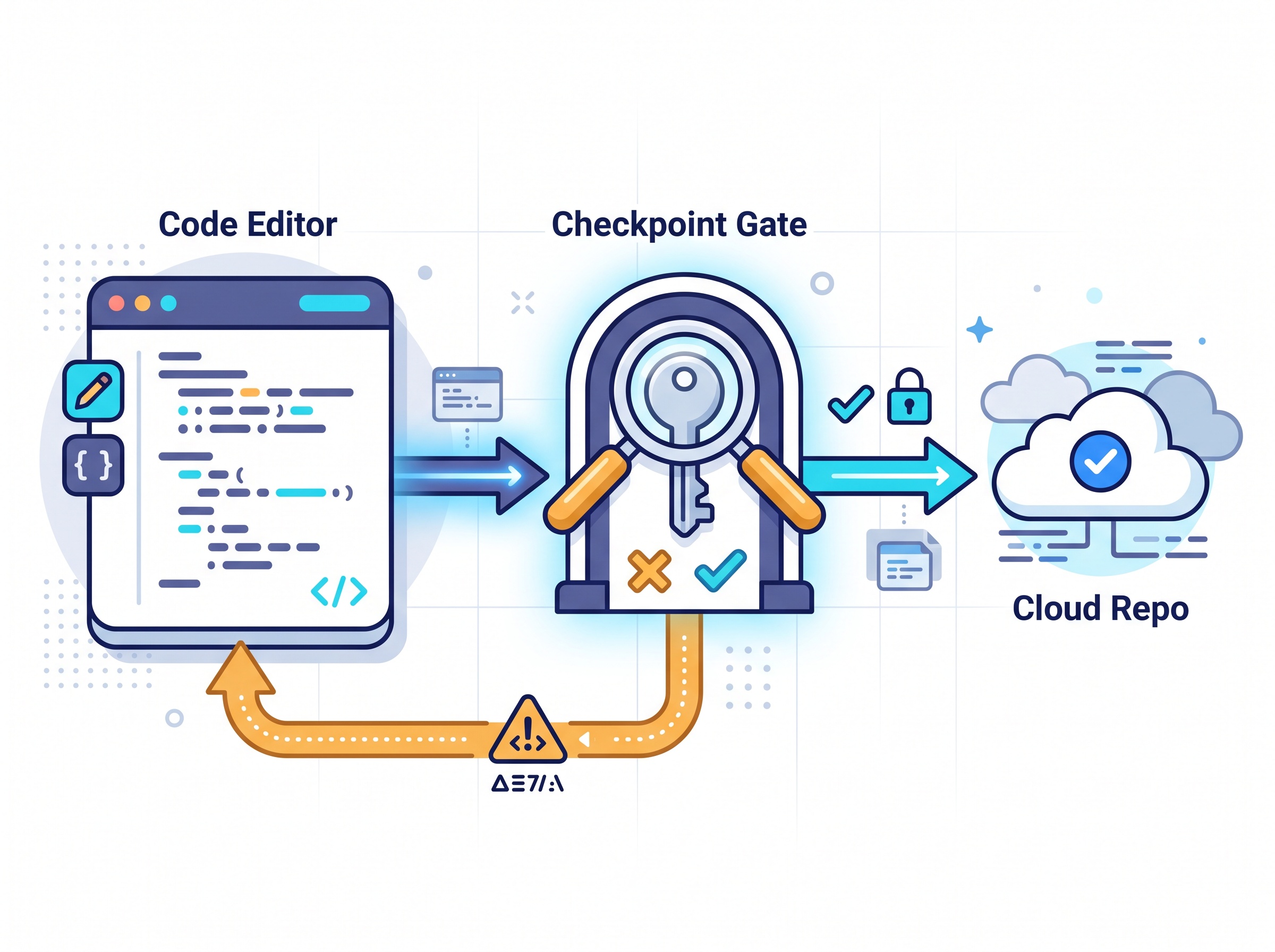
Every solution below is the same core trick. A hook is a little script that runs automatically at a specific moment — right before a commit, right before the AI writes a file — and gets a veto. If it spots something that looks like a secret, it stops the action and tells you. Code only moves forward if the checkpoint says it’s clean.
You don’t have to write these scanners yourself. Mature, free tools already know what thousands of credential formats look like — AWS keys, Stripe tokens, private keys, database URLs. Your job is just to wire one into the right moment. Think of it as a smoke detector: cheap, silent until it matters, and worth it the one time it saves you.
Layer 1: Scan every commit before it lands
This is the single highest-value guardrail, and it protects you no matter which AI tool wrote the code. You add a pre-commit hook that scans your staged changes for secrets and blocks the commit if it finds any.
- Pick a scanner.
gitleaksand GitGuardian’sggshieldare both free to install and run locally. They ship with detection rules for the common credential formats, so there’s nothing to configure to get real protection on day one. - Install it as a pre-commit hook. The
pre-commitframework makes this a few lines in a config file; after that the scan runs on everygit commitautomatically, for everyone on the repo. - Let it fail loudly. When it catches something, the commit aborts and shows you the file and line. You pull the key out, and only then does the commit go through.
Because this sits at the Git layer, it doesn’t care whether a human, Claude Code, Cursor, or Codex wrote the line. Anything trying to get committed gets frisked at the door.
Layer 2: Catch it even earlier with agent hooks
The newest and most interesting layer runs before the commit even exists. Modern AI coding tools now let you attach your own hooks to the agent’s actions — Claude Code has a hooks system, and Cursor and Codex expose similar extension points. The idea GitGuardian and others have been pushing: wire a secret-scan into the moment the agent tries to write or edit a file, so a credential never even reaches disk.
In practice you register a small command that fires on the agent’s “edit file” or “run command” event. If the content it’s about to write trips the scanner, the hook rejects the action and the assistant gets told no — often prompting it to fix its own output and use an environment variable instead. It’s the same checkpoint concept as Layer 1, just moved upstream to the AI itself. If you want the fuller picture on reining in capable agents, our guide to running coding AIs safely in a sandbox pairs nicely with this.
Layer 3: Make secrets impossible to leak by design
The strongest move is to arrange things so there’s no secret in the code to leak in the first place:
- Keep real values in a
.envfile and reference them by name in your code (process.env.DB_PASSWORD, not the password itself). Your assistant can write the reference freely because the reference isn’t a secret. - Add
.envand friends to.gitignoreso those files physically cannot be committed. This one line prevents a huge share of real-world leaks. - Never paste a live key into the chat. If the AI needs to see config, redact the values first or use an obvious fake. Once a secret is in the conversation, treat it as exposed.
- For teams, graduate to a secret manager (your cloud provider’s vault, 1Password, Doppler, and so on) so keys are fetched at runtime and never written down at all.

Your 15-minute setup checklist
You can stand up a solid safety net before your coffee’s cold:
- Install
gitleaksorggshieldand add it as a pre-commit hook in your main project. (10 minutes, protects everything.) - Confirm
.env,.env.local, and any key files are in your.gitignore. (1 minute.) - Move any hard-coded keys in your current code into environment variables, then rotate the ones that were ever committed — assume an exposed key is already burned. (A few minutes.)
- If your AI tool supports hooks, add a secret-scan on its file-edit action for an extra upstream layer. (Optional, a few minutes.)
That’s it. From here on, a leaked credential has to get past a scanner at the agent and a scanner at the commit, and your real secrets live in a file that can’t be committed anyway.
The bigger habit this builds
Letting an AI write your code doesn’t have to mean trusting it with your keys. The trust gap is real — as we noted in our look at why most developers use AI coding tools but few fully trust them — and the way you close it isn’t blind faith or white-knuckle vigilance. It’s cheap, automatic checkpoints that let you stay fast and safe. Spend the fifteen minutes once, and your assistant can sprint all it wants while a quiet machine makes sure none of your secrets ever leave the building. That’s the whole promise of using AI well: it amplifies what you can do, and you keep your hands on the guardrails.
Sources & further reading:
Related Reading
- Your AI Coding Agent Might Be Uploading Your Whole Codebase: How to Check What Dev Tools Send to the Cloud
- Your AI Coding Assistant Can Be Tricked: The GhostApproval Flaw and How to Code Safely with AI
- The Hidden Text That Can Hijack Your AI Assistant — And How to Stay Safe