ChatGPT Can Now Build You a Tool Mid-Conversation: How GPT-6’s Intelligent UI Works


For three years, talking to ChatGPT meant one thing: you typed, and it typed back. Paragraphs, bullet points, the occasional code block — but always words on a page. That just changed. With the new GPT-6 model now rolling out to the 1.2 billion people who use ChatGPT each week, OpenAI added a capability it calls Intelligent UI, and it quietly rewires what an “answer” can even look like. Ask a question and ChatGPT might reply with a chart, a map, a set of tappable buttons, an interactive diagram — or a small tool it builds for you on the spot.

If that sounds abstract, it isn’t. This is one of those upgrades you feel the first time you hit it by accident. Here’s what Intelligent UI actually is, what you can do with it today, and where it’s still a little rough around the edges.
What “Intelligent UI” actually means
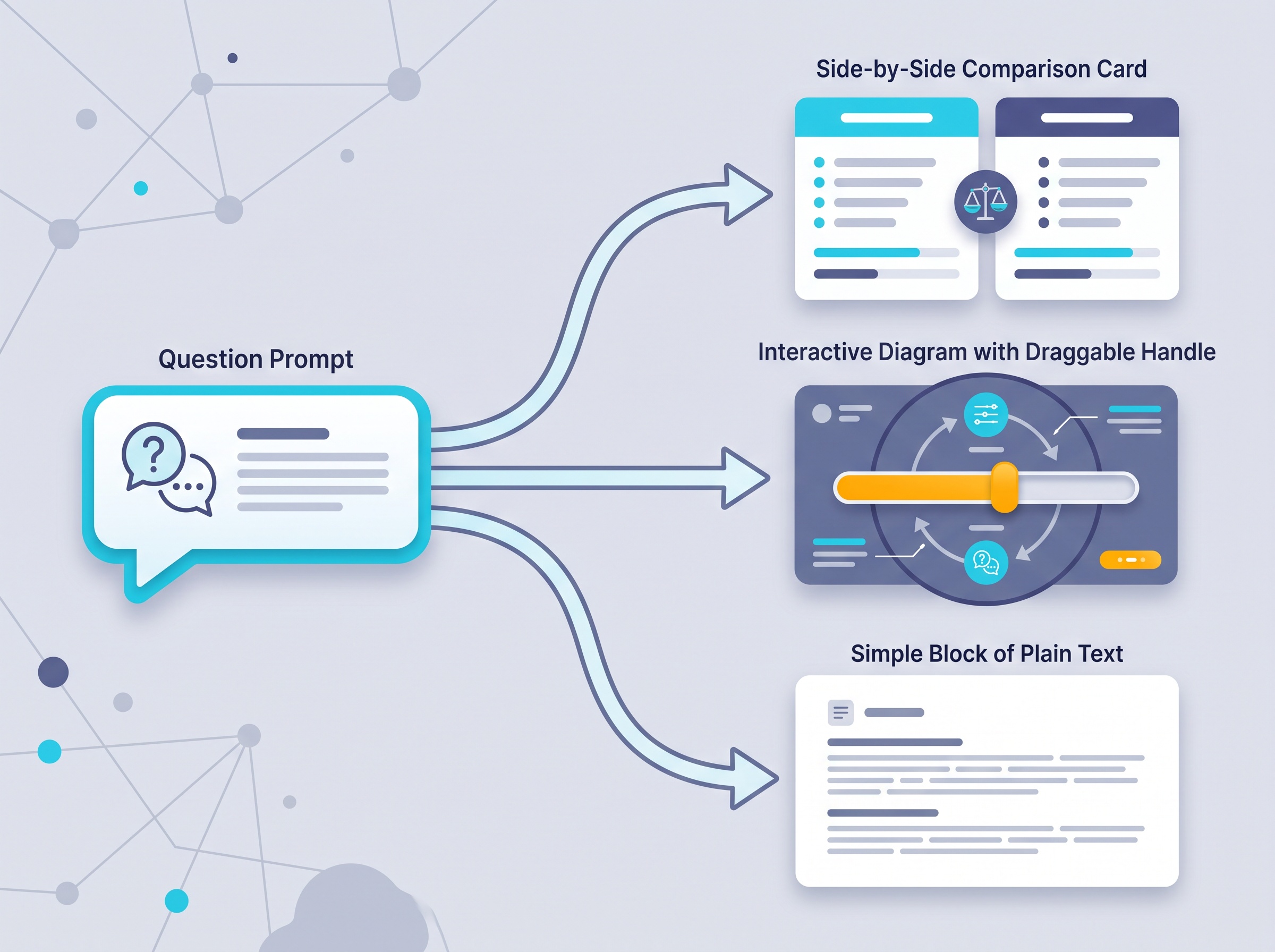
OpenAI trained GPT-6 to compose its responses out of three ingredients — text, visuals, and interactive elements — and to decide for itself how they fit together based on what you asked. So a response can now include graphics, buttons, forms, charts, and little interactive experiences you use directly inside the conversation.
The key word is decide. The format depends on the question. A comparison might come back as a side-by-side layout. An explanation of how something works might arrive as an interactive diagram you can poke at. And when a plain sentence is genuinely the most useful answer, you still just get the sentence. You’re not forced into a flashy interface for a question that didn’t need one — which, honestly, is the part that makes it feel grown-up rather than gimmicky.
What you can actually do with it
OpenAI groups the everyday uses into three buckets, and they map neatly onto things people already ask ChatGPT all day:
- More visual answers to normal questions. Ask for a Sunday roast and the cooking timings can sit alongside the recipe as a plan you can follow at a glance. Ask about a road trip and the stops can show up on a map with notes on what’s worth a detour.
- Learning complex topics. Instead of a dense explanation, you can get a visual or interactive one — change an input and watch what happens, or step through a problem one stage at a time. This is a genuinely different way to understand something than re-reading a paragraph three times.
- Tools you conjure just by asking. This is the showstopper. Ask ChatGPT for a calculator to see how your savings might grow, a bill splitter for dinner with friends, or even a small game to play in the chat — and it builds it, right there, ready to use.
That last one is the clearest sign of where this is heading. The line between “asking a question” and “getting a small app” is starting to blur, which rhymes with another recent shift we covered in how ChatGPT is turning into an app platform. One lets third parties plug tools in; this one lets the model spin up a quick tool itself.

Why this is a bigger deal than it looks
It’s tempting to file this under “nicer formatting.” It’s more than that. For the entire chatbot era, every question got squeezed into the same shape: a conversation. That’s a fine shape for a lot of things and a clumsy one for others — try comparing five options, or understanding a system with moving parts, using paragraphs alone.
Intelligent UI breaks that one-size-fits-all mold. Under the hood, OpenAI built a library of ready-made, streamable interface components and a compiler that renders them as the model generates them, so the interface appears progressively instead of after a long wait. The upshot for you is simple: the answer arrives in whatever form makes it easiest to use, and it shows up quickly. It’s the difference between being handed a recipe and being handed a kitchen already set up for the dish.
It’s also just faster
Riding along with the new interface is a speed change that’s easy to overlook but you’ll notice every day. GPT-6 can begin answering while it’s still thinking. Earlier reasoning models made you wait for the whole thought process to finish before a single word appeared; GPT-6 interleaves thinking and answering, building the response in useful pieces as it goes.
OpenAI says that for questions needing a web search, GPT-6 Instant starts answering about 44% sooner on average than the previous GPT-5.6 Instant, and that it makes smarter calls about when to look something up in the first place. Faster and more reliable on search-backed answers is a good combination — it’s the kind of under-the-hood win that quietly makes the tool nicer to live with. If you want to squeeze even better results out of it, our guide to getting a better response every time still very much applies.
How to actually use it today
There’s no switch to flip and nothing new to learn — that’s rather the point. A few practical notes:
- You already have it, or will soon. Intelligent UI ships with the new GPT-6 model that’s rolling out to ChatGPT users broadly, including free accounts. Rollouts happen in waves, so if you don’t see richer responses yet, check back in a few days.
- Just ask naturally — then nudge. You don’t need magic words. Ask your normal question; if the plain-text reply would be clearer as a layout, say so: “show me these side by side,” “make that an interactive diagram,” or “build me a quick calculator for this.”
- Lean on it for the awkward stuff. Comparisons, step-by-step plans, anything with numbers you want to tweak, or a concept that’s easier to see than read — those are where the interactive format earns its keep.
- Keep a thread going. Because the tool lives in the conversation, you can refine it: “add a tip line to that bill splitter,” “change the interest rate and show it again.” It’s a back-and-forth, not a one-shot.
Where it’s still rough
OpenAI is candid that there’s work ahead on the model’s design judgment and on expanding what it can build — so expect the occasional layout that’s more enthusiastic than useful, and don’t assume every question will trigger something interactive (many still won’t, and shouldn’t). Treat the little tools it generates as handy helpers, not audited software: double-check anything that matters, the same way you’d sanity-check any AI answer. And as always, a calculator ChatGPT builds is only as right as the logic behind it, so eyeball the numbers on anything important — the same habit of not blindly trusting output we’ve talked about with getting the most out of ChatGPT’s memory and projects.

Still, the direction is unmistakable. For years we’ve adapted to the chatbot’s one format; now the tool is starting to adapt to the question instead. That’s a small-sounding change with a big feel — because the best AI tools don’t make you learn their shape, they take whatever shape helps you get the thing done. Open ChatGPT, ask it something you’d normally dread reading a wall of text about, and see what it hands you back. Odds are it won’t be a wall of text anymore.
Sources & further reading:
Related Reading
- Beyond ChatGPT: The Productivity AI Tools Actually Worth Your Time in 2026
- ChatGPT Skills: Teach the AI a Job Once, Get the Same Result Every Time
- ChatGPT Can Now Read Your Gmail, Slack, and Notion: How App Connections Work — and How to Use Them Without Oversharing